26 Jul 2025

Crowd-avoidance alerts for UK football matches

Football is an inescapable part of British life. Even if you don't follow the league, a home game in your area can clog up roads, fill pubs, and change your weekend plans. That’s why I built Next Home Game - an app for Android and iOS that gives you timely alerts about local matches.

Just pick your local teams or stadiums, and choose when you’d like to be notified:

  • 7 days before a game

  • 18:00 the day before a game

  • 08:00 on match day

  • 3 hours before kick-off

  • At kick-off 

  • Match over (crowds clearing) 

Set it and forget it - the app will keep you in the loop.

Want more? You can also get alerts for away games and results to help stay connected with your team or local scene. There’s a countdown to the next home game, latest result, full fixtures, and live league standings.

No tracking. No data collection. No ads. Free for early adopters. 

Visit the Next Home Game website to download.

22 May 2025

Don't Throw Out That "Unsupported" Windows 10 Laptop Just Yet

If you've fired up your trusty old Windows 10 laptop and been greeted with something like: "This PC can't run Windows 11. Your computer's hardware doesn't meet the minimum system requirements."

...you might've sighed, closed the lid, and Googled "cheap laptops." But before you add another perfectly usable machine to the e-waste pile, let me reassure you: that laptop probably has a lot more to give.

I've been helping a few friends and family through this, and the good news is there are two decent options that could keep your laptop alive and well beyond October 2025 (when Windows 10 support officially ends).


Option 1: Install Linux Mint   

If you don't absolutely need Windows-specific software, Linux Mint is a fantastic choice - especially the lightweight Xfce edition.

  • It runs smoothly on older hardware.
  • It comes with everything most people need: web browser, office apps, media player, email, etc.
  • You can still use Microsoft Office via Office 365 in your browser (and there's a free tier).
  • It's totally free and easy to install.

You can download Linux Mint here

I've personally installed Mint on several "too old for Windows 11" laptops and been surprised at how well they perform. It's not just usable - it's pleasant.
 

Option 2: Force Install Windows 11

If you really want to stick with Windows, there is a way to bypass the hardware checks and install Windows 11 anyway.
Here's what to do:

    e:     (Replace e: with whatever drive letter your ISO mounted as.)
    cd sources
    setupprep.exe /product server

  • Follow the prompts and select "Keep personal files and apps" if you want to preserve everything.
  • And that's it. Windows 11 should install, even if your hardware "isn't supported".
A Few Warnings
  • Back up your files first. Seriously. Things can and do go wrong, especially with forced upgrades.
  • If your machine still runs on an old spinning hard drive, consider swapping in an SSD first. It'll make a huge difference.
  • Got spare RAM slots? Fill them. Windows 11 runs much better with 8GB or more.
  • Microsoft may one day disable updates on unsupported systems, though so far they've mostly just been grumpy about it.


I've personally run Windows 11 on:

  • A 2012 Core i3 laptop (after upgrading to SSD + 8GB RAM)
  • A 2016 Atom netbook with 2GB RAM (just to see if I could)
  • Several  other hardware configurations from the mid 2010s

It's not lightning fast, but it works - and for web browsing, documents, and video calls, it's fine.

Don't Bin . Breathe New Life Into It.

We live in an age of unnecessary upgrades. If your laptop powers on and works, it probably doesn't deserve to be binned just because it missed the TPM memo.

Try Linux. Try the upgrade trick. There is life in the old machine yet.

29 Dec 2024

20 Questions for Jehovah's Witnesses from an Ecumenical Christian

As an ecumenical Christian, I value unity in essential faith while respecting doctrinal differences. I believe in salvation by grace through faith in Jesus Christ, God the Son, who died for our sins and physically rose again. I've chatted to a number of Jehovah's witnesses (JWs) who have knocked on my door. I have also received carefully handwritten letters from JWs and followed up by email to engage in some very involved discussions about the Bible and Christian beliefs. I admire Jehovah’s Witnesses for their commitment to outreach, their diligent study of the Bible, and their desire to see God’s Kingdom come. These qualities make me eager to engage in open dialogue, even when we disagree.

While there are some general JW beliefs I agree with, there are also significant areas where I do not. I’ve found it challenging to have constructive conversations about these differences. While we share foundational beliefs, such as the Bible as the inspired Word of God and the importance of living in accordance with it, our interpretations often diverge. 

I hope this list of questions can provide a starting point for meaningful discussion and mutual understanding. I understand that these are deep and nuanced topics, and I welcome any insights you’d like to share in response.

On the Nature of Authority and Interpretation

  1. How does the Watch Tower organisation's claim to provide the only true interpretation of scripture compare to the interpretations preserved by early Christian traditions?
  2. How do recent changes in Watch Tower doctrine, like the significance of 1914 or 1975, fit into its claim of providing the only true interpretation of scripture?
  3. Is it possible that the Bible can be rightly interpreted outside of the framework provided by your organisation? If not, why not?
  4. How can the Watch Tower claim to restore "true Christianity" if it differs so significantly from historical, Eastern, and traditional Christian beliefs?
On the Identity of Jesus
  1. If Jesus is not God, how can He offer salvation to all humankind?
  2. Why do passages like John 1:1 ("The Word was God") or Thomas calling Jesus "My Lord and my God" (John 20:28) not mean that Jesus is divine?
  3. Why does Hebrews 1:6 describe angels worshipping Jesus if only God is to be worshipped?
  4. Why was the divinity of Christ accepted by early Christians, especially those closest to Jesus and the Apostles, if they were incorrect?
On the Kingdom of God and 1914

  1. Why is the year 1914 emphasised so heavily when it is not explicitly mentioned in the Bible?
  2. If Jesus became King in 1914, why do we still see so much suffering, and why hasn’t the Kingdom been fully established yet?
  3. How does the emphasis on a specific date fit with Jesus’ statement in Matthew 24:36 that "no one knows the day or the hour"?
On Salvation
  1. Do you believe salvation is earned by good works, or is it a free gift of grace?
  2. If Jehovah’s Witnesses teach that salvation requires specific works, how does this align with the example of the thief on the cross who was saved by faith alone?
  3. If works are essential for salvation, how do you reconcile this with Ephesians 2:8-9, which says salvation is by grace through faith and not by works?
  4. If worshipping Jesus is viewed as wrong, how do you reconcile Philippians 2:10–11, which describes every knee bowing to Him?
  5. How does annihilation as a punishment align with the concept of eternal consequences in traditional Christianity?
On Jehovah’s Witness Exclusivity

  1. What happened to people who lived and died before the Watch Tower existed? Were they unable to find salvation?
  2. Why are Jehovah’s Witnesses the only group practising "true Christianity", given that their beliefs are so modern and Western in origin?
  3. If God wants everyone to know the truth, why is the truth only accessible through one organisation?
These questions are not meant to attack or criticise, but to explore how our respective beliefs align with God’s Word and His truth. If you are a Jehovah’s Witness, I warmly invite you to share your thoughts in the comments. I hope these discussions can deepen our understanding, strengthen our shared commitment to living in accordance with God’s will, and foster mutual respect.

I will link to follow-up blog posts to further explore each question, depending on the feedback I receive.

4 May 2019

Voting abroad at South Africa House, London in the 2019 national elections


2024 Update: I went to London to vote in the South African national elections again and it was quite a different experience to the time before. 2019 was really quiet but the 2024 turn out was amazing! I spent 5 hours in the queue snaking all around London and going round the block more than once. Everyone was friendly, helpful and considerate and it was time well spent. I hope to do it again in 2029.

I voted from abroad in the 2019 South African national elections and the experience was a real privilege. It was so great to be one of the people who care enough about South Africa to take part in the elections, even when I was not on home soil. Apparently about 10 000 people indicated their intention to vote at South Africa house in London and knowing that up front was quite daunting. It seemed like a heck of a lot of people to have voting at a single location, even with extended voting hours. But the number of people voting was a non-issue. The whole process was organized superbly and ran as close to perfect as can be expected - I commend the IEC for their execution on the day and they also did a really good job of helping me get my ducks in a row to vote from London.

I arrived at South Africa house just after 2pm and there was quite a queue, but I wasn't totally sure how long it actually was because it was wrapped back on itself and then went around the corner. I tried to survey the scene but then dutifully joined the queue. All the expected characters were there, those singing songs about the ANC, those trying to influence last minute votes for the DA and a most welcome entrepreneurial chap handing out Jumbo biltong samples from the South African shop.

I took some snaps as the queue progressed and sent a few WhatsApp updates to family back home. It was a spring day in London, the weather could have been a lot worse but it was blowing a chilly reminder of the differences between England and South Africa down my neck. Before I knew it I was around the corner and inside South Africa house. I took some cheeky snaps of the Pierneefs from the upstairs gallery and then got into trouble for trying to take more from up close. I put my phone away like a good citizen and applied myself to the task at hand.

I was done before 3pm, so it had taken me less than an hour to be done with voting since I had joined the queue - A very pleasant surprise. I had some time to stand back and take in the atmosphere before I decided how to spend the rest of my afternoon. The hardest part was getting myself to London from Norwich, standing in the queue and voting was a breeze. I hope that it is a similar experience for everyone voting from within South Africa's borders. God Bless South Africa.


22 Jan 2017

Uber Taxi equivalent in Norwich City, UK

I am new in Norwich and wasn't entirely surprised to find that Uber is not available in the area. I could see lots of evidence of well established taxi companies, but I was sad at the thought of perhaps not getting the same convenient Uber experience, but that was only until I tried out ABC Taxis.

ABC Taxis has a really neat smart phone app (available for both Apple and Android) that let's you request a pick up from your specified location, provides a fare estimate, let's you pay by card and tracks your taxi - The whole experience is very much like Uber.


My first trip with ABC taxis went like clockwork - from booking through the app to being picked up on time, I was safely delivered to my destination in a Toyota Prius by a friendly driver with 10 years experience and paid for the trip without handling any cash or cards. Based on that I can recommend the service as professional and reliable and I will be using them again.

19 Jun 2016

In defense of Science and Christianity


[10 minute read]

Science is the study of the natural world, using a self correcting process known as the scientific method to guide us towards truth, through repeated experiment and observation.

Christianity is faith in Jesus Christ, God the Son, who was sent to earth, died a sinless death and rose again to pay the price for the sins of humanity, so that all who believe in Him would be saved.

By definition, science and Christianity are not at odds with each other. So why should we have to choose between them? Perhaps because of conflicting views on creation, evolution or the age of the earth?

The current scientific view is that the universe began 14 billion years ago in an event known as the big bang. The earth is 4.5 billion years old. Life on earth has been evolving for 4 billion years and modern humans have been around for the last 200 thousand years or so.

The Christian view, according to the Bible, is that God created the universe, the earth and all life, each producing offspring of its same kind. God created humans in His own image - He gave them a spirit and granted them authority over, and responsibility for, the earth. The Bible does not say how long ago any of this happened, though it does describe the creation process as taking place over six ‘days’ in Genesis 1 and then in a single ‘day’ in Genesis 2.

These views sound different, but I find myself defending both the scientific view when talking to Christians and the Christian view, when talking to people who are not Christians.

I defend the Christian view because the God of the Bible is real to me and I believe that He is the creator of the universe and everything in it. God created all forms and characteristics of life and He specially created humans in His image with a plan set apart from the animals. I am not concerned with dates because the Bible does not give specifics in this regard. Biblical creation is described once over six ‘days’ and again over a single ‘day’ in the very next chapter, so that these time periods are clearly not referring to literal days. The important message in the Biblical creation account is that God is the creator and humans have a special place in His creation.

I defend the scientific view because there is accessible and convincing evidence, that there was a big bang 14 billion years ago, the earth is 4.5 billion years old, life on earth has been around for 4 billion years and has been subject to changes and adaptations (evolution) during this time.

I defend both the Christian and scientific viewpoints because God could have created the universe 14 billion years ago through the process of the big bang. He could have made the earth 4.5 billion years ago and He could have created the first single celled life. God could have used single cells, with the built in ability to adapt and change, as the building blocks of life to create adaptable, multi-cellular life forms like animals and humans. God could have taken the exact amount of time and used any process He chose (including evolution) to create everything. If science ever truly uncovers all the specifics of how it happened, then we'll properly understand how God did it. As the creator of the universe, God is behind all that we study and discover in the natural world. Science is not a threat to Christianity because true Christian faith is based on Jesus Christ and on the Cross. It’s not about the details of the big bang, evolution, or the age of the earth. Science and Christianity are not at odds with each other.

The elephant in the room is the atheist view, which is the lack of belief in gods and supernatural beings. This view has a tendency to present itself as scientific and claims to hold the intellectual high ground over any God based belief. But science is limited to the study of the natural world, which means it’s an inadequate tool for exploring the existence of God or other supernatural beings. If you were unimpressed when I mixed scientific and Christian views, you should be equally unimpressed by science mixed with atheism. Science mixed with something else is no longer science and the argument really comes down to Christian faith versus atheist lack of faith - neither can be scientifically justified. You may have heard someone say, “I'm a man of science, I don't believe in God". However, this statement misrepresents men (and women) of science and it would be more correctly phrased as either, “I'm a man of science, I can not test the existence of any supernatural being”, or, “I'm an atheist, I don’t believe in God".

If supernatural belief could indeed be explained away by simply applying the scientific method, then no scientist (or any other smart person) would be a Christian believer. But there are many scientists who have made substantial contributions to both science and the Christian faith (not to be confused with ‘Christian Science’ or ‘Scientology’). You might recognise the names of Blaise Pascal, Leonhard Euler, Michael Faraday, Gregor Mendel or Lord Kelvin and there are many more examples of scientists who are Christian, including numerous Nobel prize winners across various scientific disciplines. In spite of what many atheists would like you to believe, science and atheism do not necessarily go together and there are good reasons to consider Christianity.

In terms of the number and accuracy of copies, the Christian Bible is the best preserved manuscript in history. Archeological evidence has unearthed people and places that are described in the Bible. In addition, more than 300 Biblical prophecies about the Messiah were fulfilled through the life, crucifixion and resurrection of Jesus Christ. There is a coherent story of God’s plan to save humanity that flows through the pages of the Bible, written by many authors over 1500 years - I think these points build a genuine argument for the supernatural inspiration of the Bible and I hope it would make you curious enough to at least read the gospel of John.

Most of Jesus’ disciples were martyred and none of them chose to save their lives by denying their faith in the Messiah, whom they had seen die on the Cross, appear again in His resurrected body and ascend to heaven - Surely none of them would have been prepared to be tortured, or die for a story that wasn’t true. The resurrected Jesus appeared to 500 people other than His disciples. The man who became the apostle Paul was heading up the execution of Jews who accepted Jesus as the Messiah, until Jesus appeared to him on the road to Damascus and he was dramatically converted - Paul became the instigator of spreading Christianity, instead of wiping it out in its infancy.

Christianity is the largest religious group in the world today, so perhaps you know some Christians and I hope that you have experienced the fruit of Christianity through their lives, but odds are they aren’t perfect. The matter of perfection is where Christianity is especially different from other religions - Thanks to God’s plan of salvation through Jesus, who paid the ultimate price by dying for your sins, you do not need to be perfect to approach the God of the Bible. If you sincerely look for Him, He promises that you will find Him and He will take you as you are.

Behold, I stand at the door and knock. If anyone hears My voice and opens the door, I will come in to him and dine with him, and he with Me.                 
Revelation 3:20

"For God so loved the world that He gave His only begotten Son, that whoever believes in Him should not perish but have everlasting life."                   
 John 3:16

Further Reading
 
  • Can a smart person believe in God?, Michael Guillen

  • God's Undertaker: Has Science Buried God?, John Lennox

  • Creation and Time: A Biblical and Scientific Perspective on the Creation-Date Controversy, Hugh Ross

  • The Creator on the Cross: Science in the Light of Christ and Him Crucified, Mike L Anderson

  • Mere Christianity, C.S. Lewis

  • Darwin’s Black Box: The Biochemical Challenge to Evolution, Michael J. Behe

  • God and Stephen Hawking: Whose Design Is It Anyway?, John Lennox

  • Jesus in the Present Tense, Warren W. Wiersbe

  • Heaven is for Real, Todd Burpo

  • The Biblical Archaeology Society

  • Patterns of Evidence: The Exodus

  • A Short History of Nearly Everything, Bill Bryson

  • A Brief History of Time, Stephen Hawking

  • The Science of Discworld, Terry Pratchett, Ian Stewart, Jack Cohen

  • God's Not Dead: Evidence for God in an Age of Uncertainty, Rice Broocks 

  • Einstein's Universe, Nigel Calder

  • The Case for Easter, Lee Strobel

  • Bible.com


6 Feb 2016

Check your Vodacom voicemail from a land line (or Skype out)

I recently traveled abroad and switched my Vodacom number over to SMS roaming (by texting 'roamon' to 123 before I left SA). SMS roaming is a handy way to maintain some contact with South Africa without the risks of roaming charges (though it does still cost R2.75 per SMS you send). So you can receive and send SMS, but it means that when anyone phones your SA number they inevitably don't get through to you and leave a voice message, which you get notified about by SMS.

Vodacom repeatedly let me know by promotional SMS that all I needed to do was phone  +27 82 121 0000 from a land line and then follow the prompts to retrieve my voicemail. However, I found that this number does not work at all, from either a UK land line or using Skype out... Fail.

I contacted Vodacom customer care via email who were very helpful and talked me through the first option, but they also let me have another number that I could try: +27 82 14 (followed by the last 9 digits of your cell phone number). But, alas, this number didn't work from a UK land line or using Skype out either (I mention both because strangely, I had different results on Skype versus the landline?!). Fail.

I abandoned those ideas, played about a bit and discovered that there is actually a way to get your Vodacom voicemail while you are overseas (or from any phone that is not your own cellular phone).


Here's how to do it...

1. Dial your own Vodacom Number (including country code) from any phone that can make international calls ie. +27 82 XXXXXXX
2. Press 1 while your voicemail 'leave a message after the beep' greeting is playing
3. Enter your 4 digit voicemail password (1111 by default or as set by you)
4. Listen to and manage all your voicemail messages as usual

You are welcome!

28 Sept 2014

Teach your neighbours' noisy dogs to stop barking

As long as there are neighbours, there are neighbours with noisy dogs. While my opinions on people who make no effort to control their pets' noise are probably best not discussed here, there is a humane way to take this matter into your own hands...

I had been woken by incessant barking at 3am one too many times, did some research and came across several products designed to help manage noisy dogs. While some of them are designed for your own pets - like collars that emit high frequency sound or sprays of water triggered by barking (neighbours take note!); Others are designed to help control other dogs in the immediate neighbourhood. There is a siren that is camouflaged as a bird house that emits high frequency noise, triggered by barking that you can mount alongside your noisy neighbours' garden. I was not about to spend ZAR1000 (~$100) on a gimmick that I wasn't sure was going to solve the problem though.

Based on these existing products I came up with a cheap, make shift solution, using an old Nokia cell phone...

All you need to do is  set a high pitched frequency as the tone for incoming messages and set the volume to maximum. The idea is that now when your neighbours' dogs get into a barking frenzy, you simply send an SMS message to your old Nokia cellphone (a 'please call me' works great) and it  triggers the high pitched ring tone, discouraging your neighbours' dogs from barking. It's simple but it actually works.

I use a 2 second long, 8000 hz ring tone on a Nokia 5000D and this seems to be quite effective in training my neighbours' border collies to stop barking incessantly (different frequencies may work better for other breeds of dog?). I popped the phone into a tupperware to keep it protected from sun and rain and I need to charge it about once a week but it works great!

I don't trigger the tone every time I hear my neighbours' dogs bark - I save it for those times when they enter a torturous trance of looped barking. Sometimes I do need to trigger the tone two or three times, but it always works to break the barking cycle and certainly beats getting out of bed at 3am. It has also helped to make the barking episodes far less frequent which I think suggests an element of learning on the dogs' side.

Some peace and quiet at last :)

23 Jul 2013

Asus EeePC 4G Surf revival

Update: Consider running the x86 port of Android 4.0 (Ice Cream Sandwich) on your Asus EeePC 4G Surf. Download the android-x86-4.0-RC2-eeepc.iso here and follow the instructions for installation.You won't believe how slick it will make your old EeePC!

I recently dug out my old EeePC from the back of my closet and tweaked it to better than new. The improvement is mostly thanks to a fresh installation of Zorin-OS 7 lite which I think is a totally awesome Linux distro for this netbook. It's a shame that Asus didn't use something more like Zorin-OS with the initial 2007 release of the EeePC, but it's only been around since 2009. I never imagined I could be running Chrome 28 on my EeePC and I easily re-installed Frozen Bubble and Extreme Tux Racer from the Ubuntu repositories - It's so much easier to install software  than it was using Xandros and everything is up to date!


During my investigations into upgrading the OS, I also came across suggestions that the EeePC uses standard laptop RAM (DDR2), this was a nice find as I had a spare 1GB DDR2 laptop module lying around. It was no mean feat to get to the RAM slot as the white version of the EeePC doesn't have a door underneath (apparently the black one does). I'm not going to document the full process (you can watch a video here), but I can confirm that if you carefully dismantle a white 4G Surf, you will find a standard laptop RAM slot on the back side of the motherboard. It was worth the effort as my 1GB module is working great and more RAM is always better!

I deleted all the factory drive partitions during installation (from a USB stick) and assigned the full internal 4GB drive to Zorin-OS. In the spirit of putting redundant hardware to work I slapped in an old 1GB SD card as well and set this up as the swap partition. I've got a full 1.3GB of free space on my 4G now which I didn't even dream of previously and while the 4G Surf remains well past its use by date I think I have actually made mine fairly useful again.

27 Oct 2012

Change your name in Vodacom Please Call Mes

At it's simplest, you can send a Vodacom Please Call me by dialing *140*vodacomnumber# to send a free SMS message to a Vodacom Subscriber who hopefully has some airtime to get in touch with you.

You can customize your Please Call Me settings by dialing *140#

A USSD menu will pop up with the following options:
  1. Block/Unblock Call Me Messages
  2. Send Recharge Me
  3. Send Call Me
  4. Change Name
  5. Disable/Enable Adverts
The option to change your name will let you change your own, custom 10 character name / message once a day and the Disable/Enable Advert option will stop you from receiving adverts in Vodacom Please Call Mes that are sent to you. You can also block Vodacom Please Call Me messages entirely by selecting option 1.

7 Oct 2011

GEMP (Medicine) at Wits - How to not get accepted

 June 2017 Update: "Based on general comments I have received over the years I would like to explicitly state the point of this article up front: Don't let anyone tell you that you can just keep going through the motions, ticking boxes and that you will eventually get into medicine by trying for long enough (or for having enough passion) - There is a high chance that things will not work out and you will probably be left at least a little bitter about the outcome. In addition to this, I would like to draw specific attention to the fact that I do not make any reference to race in this post or any of my comments related to this post."

Johannesburg, South Africa 

First attempt
  • Start by nurturing a passion to become a doctor for as long as you can remember
  • Add a natural aptitude for science and technology
  • Participate (and perform well) in sport (first team rugby), cultural activities (play the piano from age 7) and academics at school (and be a prefect)
  • Get a basic first aid certificate
  • Donate spare time to volunteer work in hospitals and clinics
  • Complete an IEB matric at a Jo'burg private school with results that are good enough to be offered a place in electrical engineering (where the academic entry requirements are higher than for medicine)
  • Apply for entry into first year medicine at Wits Medical School (2001)
Second attempt
  • Complete a Bachelor of Science degree in human anatomy and physiology at the University of the Witwatersrand
  • Make special arrangements to complete a basic life support (BLS) training course from the American Heart Association (this course is run for qualified healthcare professionals) - Get higher test results than qualified healthcare professionals who are on the course with you
  • Continue volunteer work at a christian primary healthcare clinic
  • Make rural hospital visits with an old (practicing) professor of surgery
  • Apply for entry into the Graduate Entry Medical Programme (GEMP) at Wits Medical School with a respected surgeon as your referee (2004)
Third attempt
  • Accept an offer to join the experimental physiology honours class at Wits Medical School
  • Contribute to the medical research community by collecting cardiovascular data that is published in the American Journal of Physiology
  • Help second year medical students in physiology lab tutorials (one of  whom didn't know what diarrhoea is and another who was repeating second year medicine for the 3rd time - painful, but true stories)
  • Apply for entry into GEMP at Wits Medical School again, this time with an A rated physiology Professor as your referee (2005)
  • Get excited when you are short listed for an interview
  • Mention that you want to "help people" during the interview
  • Have the dean of student affairs warp your answers and talk over you for the remainder of the 'interview'
Move on
  • Reinvent yourself
  • Get on with life in a completely different field, continue to "help people" in other ways and don't feel too bad that the only thing you've really sucked at so far (in spite of a rather wasted medical background), is getting in to study medicine at Wits Medical School...

22 Mar 2011

Home made mouse trap for a live catch

We had a little guest move into the kitchen the other night. A house mouse was living up in the base of the fridge and my first thought was poison, but after chatting with my wife, I decided to try something more humane.

This home made setup requires:
  • A plastic bucket or bin that is about 50cm deep
  • kebab stick (or similar)
  • Paper
  • and peanuts (the bait)

Set the trap for a live catch:
Suspend the paper over the bin using the kebab stick as precariously as possible. Then place a few peanuts on the paper at the side furthest from approach. Make sure there is no other food around to cause distraction and then vacate the area.

We decided to use peanuts and raisins since the little chap had already exposed his desires by chewing at the bag while it was on the counter the night before. I set the trap at the edge of a stool in the kitchen so that the mouse would have access to the top of the bin. He must have been hungry because I saw him scouting the kitchen while we were still up and the light was even on. But it didn't take long before we heard a small crash and the mouse was caught!

I relocated the little fella to the back garden where he dashed into the safety of the bushes. I know there's a chance he'll be back for more peanuts but we'll see I guess...

31 Aug 2010

Geographic target and your website Rankings (Google Webmaster Tools)

I have been wondering about how the “geographic target” setting (under site configuration, settings) in Google Webmaster Tools might affect a website’s search engine rankings (if at all) for a good nine months now. And I have finally reached the conclusion that the “geographic target” can influence Google SERPS quite drastically.

Keyword Ranking Graph from sheerseo.com

I was working on Search Engine Optimisation for a company that wanted to perform well in the US rankings (Google.com) and so I set the “geographic target” to “United States” on December 8th (1). By the 21st of December I had seen a massive general improvement across my keyword set for this website in the Google.com rankings. We had also just completed a very aggressive back link building campaign so it was impossible to isolate a clear cause and effect.

However, on the January 29th (2) I was instructed by a company director to remove the US reference from the Google SERPS. Google was appending "(us)" to results from this website and the director was concerned that leads from non-US regions would not click through. So, I removed the “geographic target” setting for this website from Google Webmaster Tools.

By early Feb, rankings for the keywords in my set had plummeted on Google.com. I suspected that the drop was caused by the “geographic target” change but there were other confounding factors (we lost links from a high authority site through down time on their side). On explaining the situation to the directors I was instructed not to revert the “geographic target” setting.

I continued with every day SEO but on the 11th of August (3) I “secretly” reset the “geographic target” back to “United States”. By the 30th of August the Google.com rankings were way up again! Fortunately, it seems that Google is not appending "(us)" to the results any more, so I should be able to keep my secret ;) I certainly don’t want to fiddle with the “geographic target” again, even though it would be an interesting exercise to challenge these "findings".

Note: “geographic target” can not (does not need to) be set for country specific domains such as .co.za .fr etc

Log data from Google Webmaster Tools

19 Aug 2010

Edit your Blogspot / Blogger Post Title Tag for Search Engine Traffic

It has always bugged me that my Blogspot title tags took the format of "richelectron: Blog Post Title" because this is not best practice in terms of SEO. Most relevant keywords should be grouped more towards the left of a title tag for best results to generate traffic from search engines. This means that Blogspot blogs are optimized more for their blog name rather than their individual post title keywords by default. i.e. A better title tag for this blog post in terms of SEO would be "Edit your Blogspot / Blogger Post Title Tag for Search Engine Traffic | richelectron" which is exactly what I have changed it to, and here is how to do it:
  • Login to your Blogspot dashboard
  • Click the Design tab, followd by "Edit HTML"
  • Click Download Full Template (as a backup)
  • Delete the following line from your template code

    <title><data:blog.pageTitle/></title>
  • And replace it with this:

    <b:if cond='data:blog.pageType == "index"'> <title><data:blog.title/></title> <b:else/> <title><data:blog.pageName/> | <data:blog.title/></title> </b:if>
Click "SAVE TEMPLATE", followed by "View Blog" and you will notice that your blog post titles use a new format that should help to improve your search engine traffic.


p.s. Isn't it interesting that Blogspot is owned by Google and yet the blog post title tags are not optimized for search engines by default? Have you ever noticed that Blogspot posts do not have a meta description tag either?

18 Jan 2010

Looking after your Siamese Fighter (betta)

‘Snoopy’, a Siamese fighter or betta was my very first exposure to tropical fish, probably more than 10 years ago. I purchased him out of one of those shameful setups where they showcase the attractive colours of several betta on the shelf top, each in their own tot glass worth of water. While this issue is not the central focus of my post I would like to encourage anyone who is considering a betta purchase to rescue one of these poor chaps from a similar scenario. Sure, betta can survive the harsh conditions of small volumes of water and lack of heating but they will be much happier in a proper aquarium setup. Betta are hardy little buggers and this makes them fairly easy to care for, it doesn’t mean that they warrant less care than any other tropical fish.


I was recently presented with the opportunity of a fresh aquarium setup and embraced the chance to revisit my betta days. I diligently prepared with some fresh betta research (I had Google and the www this time after all) and was quickly reminded of the same old betta FAQs:

Betta FAQ 1: Can I cycle my tank with a betta?
Betta FAQ 2: Can I keep other fish with my betta?
Betta FAQ 3: What should I feed my betta?

… which I hope to contribute to with my experience and hopefully shed some light on now.

Question 1: Can I cycle my tank with a betta?

The short answer is yes, you can. I popped my new betta, ‘Blue’ as the first fish into his new home (my trusty JEBO R338) and he was happy from the word go. I just ran the tank for a good two weeks (until the water cleared) before introducing Blue and then fed him just once a day for the first month or so.

The long answer is that cycling a tank with fish can be very stressful for the fish, so water changes and careful monitoring are a must! Overfeeding is never good, but you must take special care not to introduce excess food into the tank during the tank cycle. There is also unfortunately no guarantee that any fish will make it through a tank cycle alive.


Question 2: Can I keep other fish with my betta?

The short answer is yes again. However, you should stick to these guidelines.

Do not keep brightly coloured fish with your Betta. I would peg it at a 90% chance that he will chase them and injure them, even if he doesn’t harass them all the time. If you must have other fish in addition to your betta, rather add fairly plain (non-agressive) fish or fish that do not generally stick to the same parts of the tank that he does.

I followed the ‘advice’ of an arbitrary forum post that I found on the internet and tried to house a school of Cardinals with my betta. He paid no attention to the new school at first, but a few days later I noticed that 2 had disappeared, and then I spotted one without an eye… Blue had been ‘hunting’ them during the night. I quickly rescued the survivors to the fish tank at work where they now live happily with a bunch of harmless Platies.

Having said that, Blue never bugged the Corydoras, Otocinclus cat (they were never in his way) or Ghost glass cat fish that I placed with him in the end (I don’t think he could see them for their transparency). So you just need to exercise some care when placing additional fish with your betta and consider question 3 at the same time.


Question 3: What should I feed my betta?

Most local fish shops will happily sell you just a box of ordinary fish flakes when you purchase a betta, with not an ounce of further advice. But you need to know that betta have temperamental digestive tracts and they get ‘clogged up’ if they are fed on fish flakes alone. You should vary your betta’s diet to include flakes, pellets and blood worms to stop problems from developing. As a side note, if your betta does become constipated, you can fast him for a day or two and then try and get him to eat some of the inside of a cooked pea (he won’t be able to digest the pea skin, you need to remove it), this will help to clear his system.

The question of feeding should also be elaborated on to include “How much should I feed my betta?”. Betta are greedy little fellas and they will over eat quite happily in the classic, clichéd fish way (and then beg for more). Your betta’s food intake should be monitored strictly by feeding him only as much as he can consume in about a minute, twice a day and even just once a day some days. Excess food should always be removed.

I need to highlight how this feeding issue now links back to question 2 – because betta are greedy little fish (and top feeders), they will often gobble up most food as it enters the tank. This makes it difficult to make sure that other fish in the tank are actually getting enough food without over feeding your betta. You could find yourself (as I did) regretting that you added additional fish to your tank - Blue unfortunately manged to eat himself sick and passed away. Looking back I would have to recommend that betta are kept in solitude to prevent over eating. Though you may find that you could keep some bottom feeders (such as corydoras) along with your betta quite happily as long as you fed them specially formulated bottom feeder food that your betta will not be able to just gobble as easily (this theory is untested).


However, I’m sure that there are exceptions to these rules as there always are – share them in the comments if you know of any :)

30 Jan 2009

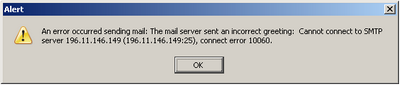
Cannot connect to SMTP server

Not being able to send mail using your outgoing mail server of choice is frustrating! Particularly when you consider that the problem is probably a result of your *ISP deciding what is best for you. Whether you are connecting from home, work, school, university, college or a WIFI hot spot at an airport or coffee shop, you are at the mercy of their firewall policies which may prevent you from establishing certain connections, such as to your outgoing mail server. They do this to try and prevent spamming from their networks, despite it being a rather antiquated method. No matter, there are several ways to get mail out and if at first you cannot connect, try one of these other options:

*Please note that in this article I have used the term 'ISP' in a very broad sense, referring to the entity that is providing your Internet connectivity at the time you would like to send your mail, not your personal or home Internet service provider in all cases.

1. Send mail through your *ISP's outgoing mail server on port 25 (default)
This is the simplest solution. Your ISP SMTP server details will be something like mail.isp.com or smtp.isp.com on the standard port 25. These settings should be readily available on your ISP's website or from tech support.
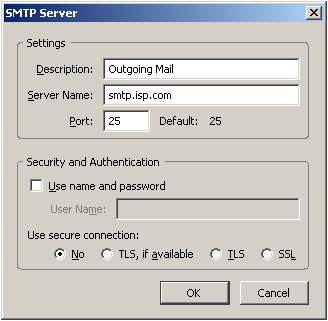
This solution may be perfect for your home desktop PC that is always connected to your ISP's local network, however you may find this sort of setup irritating when used on a laptop as your ISP may block incoming connections from outside networks on port 25. i.e. You may be able to send mail provided you are sending mail through your home connection, but then not be able to send mail from a coffee shop access point.

2. Send mail through a different port
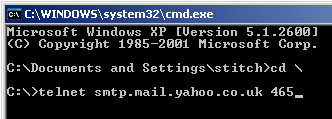
If you cannot contact a mail server on port 25, then you can also try port 465 or port 587. A quick way to check if these ports are open on your connections' firewall is to use telnet from the command line. Select, 'Start', 'Run', and type 'cmd'. This will open a command line window. Now type 'telnet smtp.isp.com 465' where smtp.isp.com is your mail server and 465 is the port. Yahoo! accepts outgoing mail connections on port 465 (SSL) so we'll use it as an example.

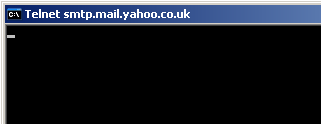
If the port is not being blocked by your providers firewall you should be presented with a blank screen and blinking cursor
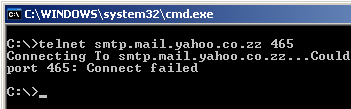
Alternatively, if the port is blocked or you make a spelling error (smtp.mail.yahoo.co.zz) in the server address you will receive the following error
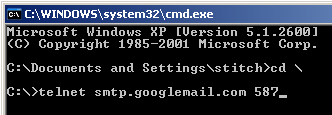
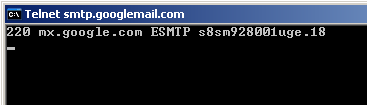
Gmail accepts outgoing mail connections on port 587 (TLS).

You should see feedback similar to the following if you telnet into the Gmail server successfully.
Port 587 and 465 connections provide secure connections and you will need to authenticate if you want to send mail through one of these ports. i.e. You will require a valid account with a user name and password for the server you are using - Gmail, or Yahoo! mail etc...

But, a successful telnet connection indicates that you can alter your outgoing mail settings to send mail through the corresponding port.
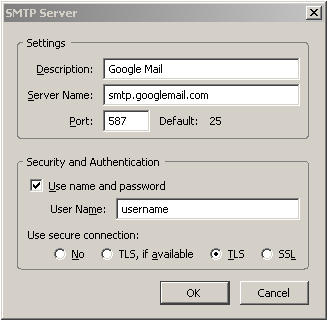
This is a nice solution as it should allow you to send mail from most networks and will save you having to change your mail settings or experience trouble every time you try and connect from a different network - a most handy configuration for mobile connectivity.

3. Send mail through a non-standard port (80 for example)
Port 80 is the port that browsers use to connect to websites, so it is a pretty sure thing this port will be open on most firewalls. This means that you should be able to send mail through port 80 under most circumstances - provided that you can actually find a mail server that accepts outgoing mail connections on port 80 of course. One example of such a mail server is Secure SMTP Server, which is unfortunately a paid service - as I am sure most outgoing mail servers with a port 80 configuration will be.

You may also find that your ISP is configured to accept outgoing mail on a non-standard port (other than 80,465 or 587). Port 2525 is sometimes used as a substitute, though this will be ISP specific and you should contact your ISP's technical support to find out.

4. Send mail using web based interfaces
By this point, you are running low on solutions and if the above options are not working for you then chances are that access to web based email sites like hotmail, Gmail and Yahoo! Mail will be blocked too.

Otherwise try to access your ISP's mail server from your browser - the address will look something like http://mail.isp.com or http://smtp.isp.com. There should be a 'log in to my account' link or something similar on your ISP's website, otherwise contact your ISP's technical support for help.

3 Jan 2009

Sony CDX-GT270s Wiring (How to Install a Front Loader)

Recently I replaced the rather embarassing Panasonic cassette tape player in my Mercedes 190E with a new sony CDX-GT270 front loader head unit. I was concerned to find that the wire harness supplied with the sony unit did not look exactly like the Panasonic's harness and my enquiries at the electronics shop were met with an attitude of "if you have to ask you really should get someone else to install it for you". But it only required a little research (just to err on the side of caution) and I managed to get it working and save myself a little cash too.

The process was pretty simple in fact, all I needed to do was:
1. Disconnect the negative terminal of the car battery
2. Slide the Panasonic cassette player out of the console using the release keys
3. Cut the wires off the old Panasonic harness one by one and crimp them onto the matching colours on the sony harness
4. Plug the harness into the sony head unit and connect the antenna
5. Slide the sony unit into place
6. Reconnect the car battery

I can't believe I almost paid someone else to do it. You don't even need to know exactly what colour wire does what, but for the sake of being thorough - the car audio wiring standard is as follows:


white : front left (+)
white/black striped : front left (-)
grey : front right (+)
grey/black striped : front right (-)

green : back left (+)
green/black striped : back left (-)
purple : back right (+)
purple/black striped : back right (-)

black : negative / ground
blue : antenna up/down
red : igntition (+)
yellow : battery (+)
blue/white striped : AMP on/off

Useful car audio links:
Sony XR4950X Car Stereo Installation
Home and Car Audio Answers

Download Sony CDX-GT370/s CDX-GT270/s CDX-GT160/s manual
Download Sony CDX-GT370/s CDX-GT270/s CDX-GT160/s installation